
Chipboard slat walls: how to configure a decorative slatted wall panel
Configure chipboard slat walls online: upright or flat slats, the spacing between them, colours and wall size, with the price calculated instantly as you go.
The slatted wall has moved from design hotels into living rooms, bedrooms and hallways. It warms up a room, hides cables, frames the TV area or the head of the bed, and suits a minimalist interior just as well as a warm, textured one. You can now configure one yourself at technefurniture.com/configurator/riflaje: decorative panels made of chipboard slats on a backing board, built to the exact size of your wall in the Téchne factory.
Chipboard slat wall vs fluted MDF fronts
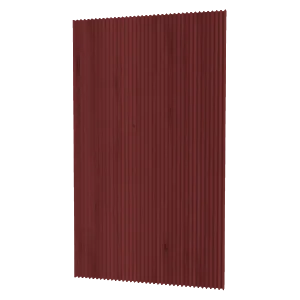
Don't confuse the two products. We have already written about painted MDF doors with fluting — there, the grooves are milled into a wardrobe front. The slat wall in the new configurator is something else: a wall panel built from separate chipboard slats fixed to a backing board. The slats have real relief, and the gaps between them show the backing — which is why you can play with two colours.
Two slat types
Upright slats
The slats stand on edge, perpendicular to the backing board, and project from the wall. You choose how deep the relief is: between 40 and 120 mm. The deeper the slat, the stronger the shadows between slats and the more sculpted the wall looks. This is the classic slat wall, the one in the picture above.
Flat slats
The slats lie flat on the backing, wide face towards the room. You choose the slat width between 30 and 120 mm. The relief is subtler and the effect is closer to a board-clad wall with regular joints — a good choice for narrow hallways or wherever you don't want the wall to project much into the room.
Slats and backing board are 18 mm chipboard, edge-banded on the visible edges.
Spacing between slats
With the “Distance between slats” slider you choose how open or dense the slat wall is — between 10 and 120 mm. The configurator starts from about 18 mm, which gives the classic dense look. The value you pick is approximate: the configurator adjusts it slightly so the slats fit exactly across the wall width, with a slat at each edge. Below the buttons you always see the exact spacing and the number of slats, and a dimension in 3D shows the distance between two slats in the middle.
Wall size and panels
You enter the width and height of the area you want to cover, directly in millimetres: width from 30 cm up to almost 10 m, height from 30 cm up to 275 cm. A single panel is at most 80 cm wide, so a wider wall is automatically split into several panels of similar widths.
The joint between two panels is not visible: it is hidden behind a slat that overlaps the panel edge. If you still want to know where the joints are — for example, to line them up with a socket or the edge of a TV — press the info button in the left bar: the joints are marked in red above the slat wall, and the list shows each panel with its width and number of slats.
Panels are joined with wooden dowels, and the slats are fixed to the backing with concealed IX Connect connectors and dowels; the configurator shows how many in the slat wall information.
Colours: slats and backing
You choose the slat colour and the backing colour separately, from the same chipboard decors used for wardrobes and sideboards. For the backing you have two options: “Same as slats” — a calm, single-colour slat wall — or “Other decor”, for contrast. The slat wall in the picture, for example, combines oak-look slats with a dark grey backing that deepens the shadows between slats.
A few combination ideas:
- wood on wood, same decor — warm and natural, ideal for a bedroom;
- wood on dark grey or black — strong contrast, great behind a TV;
- white on white or a light plain colour — texture without colour, for minimalist interiors;
- the same colour as the wardrobe in the same room — see them together in the Room Planner.
A painted MDF version is listed in the configurator as “coming soon”.
See the slat wall in 3D and in your room
The slat wall is shown in 3D against a wall, with a human figure for scale, and you can rotate it 360° to see the relief from the side. Dimensions show the total width, the width of each panel and the height.
When you are happy, you can add it to the cart or, from the Room Planner, save it straight into your room, next to your configured wardrobes and sideboards. That way you can check that the slats match the rest of the furniture before you order. If this is your first time using the planner, our guide on planning your room in the Room Planner will get you started.
Where a slat wall works
- Behind the TV — combined with a wall-hung TV unit, it hides cables and frames the area.
- Instead of a headboard — a panel as wide as the bed, or across the whole wall up to the ceiling.
- In the hallway — discreet flat slats that don't narrow the passage.
- In the home office — behind the monitor, also a good video-call backdrop.
Price and installation
The price is calculated instantly from the size, slat type and size, spacing and chosen decors, and updates with every change. Installation is not included; if you don't want to do it yourself, a Téchne-certified installer in your area can help, with the price agreed directly with them.
Ready to try? Open the slat wall configurator, enter your wall size and play with the slats until you find the right look.